# Ostara 101

{% hint style="info" %}
Looking to get started immediately? Check out the [Quick Start](/getting-started/quick-start) guide!
{% endhint %}

Ostara is a modern tool for managing and monitoring actuator-enabled microservices that aims to make the process more user-friendly and straightforward.&#x20;

One of our main goals with Ostara was to create a tool that just works out of the box, without needing anything besides a functioning Actuator API on the other end. ([Why Ostara](/getting-started/why-ostara))

Ostara allows you to gain insights into the performance and health of your microservices by providing real-time monitoring of critical metrics such as CPU and memory usage.

One of the key benefits of Ostara is its simplicity. The tool is designed to be easy to use and requires minimal setup. All you need is a running instance of your microservice with Actuator enabled, and you can start monitoring and managing it with Ostara.

<figure><img src="/files/jWENNCrIEdYREbY6TjuA" alt="Boost Dashboard"><figcaption></figcaption></figure>

{% embed url="<https://youtu.be/5KoHNPjBnUk>" %}


# Why Ostara

### Why Ostara?

The first question to ask is *why* even use Ostara, when excellent tools such as Spring Boot Admin already exist?

As Spring Boot Admin users, we had to ask ourselves this question before embarking on the development journey of Ostara. For all its greatness, one thing Spring Boot Admin that cannot be said about Spring Boot Admin is that it's plug and play or 'off-the-shelf'.

There are two components to consider when implementing Spring Boot Admin in your ecosystem;

#### THE SERVER

To setup Spring Boot Admin, we start by having to create Spring project for the server itself (In our case, which is true for many, also meant we have to setup a full CI/CD flow, complete with Helm charts and Docker images in order to create a full production flow)

If we needed additional features such as authentication, notifications and so on, we would need to add them [directly to the project](https://www.baeldung.com/spring-boot-admin). All of this, despite the infinite versatility it offers (because it is essentially a blank slate), raises the startup costs of Spring Boot Admin *considerably*.&#x20;

Even more so when you remember that you have to continually maintain this project as with any other project within your code ecosystem, either due to security updates to unrelated dependencies you may have needed to add, or in order to update Spring to match your main project(s)

But aren't there ready-made images of Spring Boot Admin Server? A quick Google search will show a few (often outdated) pre-built ones that people in the community have created for different scenarios, including this official [codecentric/spring-boot-admin](https://hub.docker.com/r/codecentric/spring-boot-admin) Docker image which states:

> This repository contains pre-build Docker Images containing basic and hence not production-ready builds of Spring Boot Admin.

#### THE CLIENT

In order to register instances on Spring Boot Admin, you have to add the `spring-boot-admin-starter-client` dependency to your app and point it at the admin server. From personal production experience in mature projects, this isn't always a pleasant, straightforward experience.

If your project guards Actuator's endpoints with Spring Security, you also have to configure the client to send the server the credentials it will need when registering itself.

Alternatively, if you use Spring Cloud Discovery within your ecosystem you will be able to use that in order to discover instances, dependency free, but not hassle free, as you will again have to add this to your server's project and configure on both ends.


# Quick Start

### Download and Installing Ostara

In order to download and install Ostara, head to the [Latest Release](https://github.com/krud-dev/boost/releases/latest) on GitHub and download the binary for the platform of your choice.

### Demo

Ostara contains an in-app demo, the demo allows you to play around with a preconfigured, live Spring Boot application with Actuator and see most of the features Ostara has to offer. Read more on how to start the demo in [In-App Demo](/features/in-app-demo)

### Usage

In order to use Ostara you must have a running and accessible Spring Boot application with Actuator.

Spring Boot, by default, does not expose most Actuator endpoints. While Ostara can work even in these minimal conditions, we recommend that you expose your actuator like so:

```
management.endpoints.web.exposure.include=*
management.endpoint.health.show-details=always
```

If your Actuator endpoints are protected, you may apply these authentication settings when creating your application in Ostara. For more information, see [Authentication Settings](/documentation/authentication-settings).

Once your instance is ready, head to [Creating / Updating Instances](/documentation/instances/creating-updating-instances).


# Privacy

### Introduction

This Privacy Policy explains how your personal data is collected, used, and disclosed when you use Ostara.

### Personal Data We Collect

Ostara uses Amplitude ([Privacy Policy](https://amplitude.com/privacy)) for analytics and Sentry ([Privacy Policy](https://sentry.io/privacy/)) to collect anonymized analytics and anonymized error data.&#x20;

These may be opted out of at any time in the application's settings page.

### How We Use Your Personal Data

Personal data is collected via 3rd party analytic tools. We use this data to improve Ostara, as well as to understand how our users interact with it. Specifically, we use your personal data for the following purposes:

* To provide you with technical support and to diagnose and fix errors in the app.
* To analyze how our users interact with the app and to improve its features and functionality.

### Sharing Your Personal Data

We do not sell or rent your personal data to third parties. We may, however, share your personal data with third-party service providers who provide us with services such as hosting and maintenance of our app, analytics, and error reporting

### Data Retention

Ostara does NOT save any personal data, all data is save on your local machine. We use analytics tools that will retain your personal data for as long as necessary to fulfill the purposes for which we collected it. When we no longer need your personal data, we will securely delete or anonymize it.

### Your Rights

You have the right to access, correct, and delete your personal data. You also have the right to restrict or object to our processing of your personal data. If you choose, you may opt out of sending your data to 3rd party analytics tools. This can be done in the applications settings page \[LINK]

### Changes to This Privacy Policy

We may update this Privacy Policy from time to time. We will notify you of any changes by posting the new Privacy Policy on this page.

### Contact Us

If you have any questions or concerns about this Privacy Policy, please contact us at <admin@krud.dev>


# Changelog

### 0.12.0

#### Major Changes

* Added agents ([More Information](/documentation/agents))

#### Minor Changes

* 556adb6c: Added snap support for main sidebar to allow full screen dashboard
* 41bf060f: Improved app updater mechanism
* 53150176: Added multi item selection and actions in the navigator tree

#### Patch Changes

* 01ed858c: Fixed react query offline behavior
* 7f29a900: Fixed ResizeObserver loop limit exceeded error
* 3bf39ce3: Fixed app updater quit and install
* 9945e576: Added network check to check for updates
* 30a02279: Fixed 'value' in actuator environment response not being transformable to string

### 0.11.0

#### Minor Changes

* 55a399d0: Added auto updating for Windows
* bec2a8cf: Added Info page
* 32e44c66: Added Health page
* 9057aefc: Added Logfile page
* f9a020d2: Added settings page with sections
* 7ef07f41: Added system backups manager to app settings
* ed26b3a8: Added metrics value formatting by unit
* 1825ea8a: Added UI animations
* acb26092: Added build and git info to instance
* 279a9319: Improved home screen feedback ui
* c9d870f4: Improved folder-applications and application-instances tables empty states
* 00e585ef: Added preview for import config and restore backup

#### Patch Changes

* d6253787: Fixed manually downloading updates to only allow one click
* ff984587: Fixed missing sort when exporting folders
* e5bde84c: Fixed navigator tree move/rename/delete async methods
* f6089d6d: Fixed slowness when navigating from instance dashboard to another page

### 0.10.0

#### Minor Changes

* 39de2121: Added application dashboard
* 1097b051: Added join discord buttons to home screen
* b56c2f46: Added notifications settings
* 230be293: Added ability to shutdown instances
* 421a4271: Added ability to cancel heapdump downloads
* 72697846: Added application health notifications
* 02d736a4: Added methods to send direct feedback
* a1218544: Added folder dashboard
* 26d11967: Added ability to configure notifications for metric changes
* bc717019: Added option to export / import configurations
* 52be8657: Added tooltips to navbar buttons
* fb235a9c: Updated start demo design to be more prominent
* 9fa6cf20: Added global dashboard
* 9188bc31: Added automatic selection of instance/application/folder on creation

#### Patch Changes

* c4ea9924: Fixed application health not updating after cache eviction
* 8b3732f8: Fixed instance active profiles overflow ui
* 5a4e450d: Change app updater to run once on app start if enabled
* b1877064: Fixed analytics not sending heartbeat event
* 8e8dc99d: Removed ability to move instances between applications
* 94527477: Fixed dashboard loading ui bug
* 58d20a08: Fixed demo created multiple times
* 216ec437: Fixed dashboard widget not available state
* c521002b: Fixed beans table dependency click not working when filtered
* 16e1599d: Fixed table action tooltip for disabled actions not interactable

### 0.9.0

#### Minor Changes

* 26211c7: Added manual app updates mechanism
* 3a04b8b: Added ability to disable SSL verification for applications
* 18b5f69: Added Togglz support
* 2b6508e: Added analytics heartbeat and additional demo events

#### Patch Changes

* c23fa41: Fixed demo application not opened on start
* 7d0e0e0: Fixed dashboard metric error handling
* 58b2df7: Fixed global api error handler invalid app rerenders

### 0.8.0

#### Minor Changes

* 1ed0b79: Added in-app demo
* 78106d6: Deep sort app properties keys alphabetically

#### Patch Changes

* 70fe8ca: Add missing pattern nullcheck to the multi date deserializer
* 5d7cfd2: Fixed grid text line break mid-word

### 0.7.0

#### Minor Changes

* debaf31: Added analytics events and disabled analytics in developer mode
* 75551a4: Rename app from Boost to Ostara
* 2614ab0: Added error boundary and user feedback on error

### 0.6.1

#### Patch Changes

* 43dc6f6: Added signature for x64 native sqlite library for mac

### 0.6.0

#### Minor Changes

* e3b5ce7: Added empty state to thread/heap dump tables
* e7819fb: Added loading state to log level toggle
* d9df5fe: Added redaction warning for masked actuator response

#### Patch Changes

* 8ace76b: Fixed analytics implementation with amplitude
* d3261ac: Fixed heapdump download in MacOS
* 7cc135d: Add default values to all fields in actuator responses

### 0.5.0

#### Minor Changes

* 789d2e0: Added app version updated dialog
* b67f7b4: Added default actuator url from clipboard to create instance form

#### Patch Changes

* 4e5930e: Fixed thread profiling thread data card ui
* f6849d2: Fixed navbar tooltip doesn't disappear when dragging
* 4384b82: Fixed URL regex not allowing dashes
* 4637100: Fix incorrect non-nullable type for dispatcherServlet in mappings response
* 87d4c87: Fixed update item icon ui
* 2c9ce4f: Fixed disable error reporting in renderer for development
* 31c8b52: Change Http Request Statistics by Statuses to be key by string instead of int
* b1ea44b: Fixed url regex path allowed characters

### 0.4.3

#### Patch Changes

* 1467cc0: Change update check frequency

### 0.4.2

#### Patch Changes

* 26a8c3b: Fixed windows icon size

### 0.4.1

#### Patch Changes

* b9094e7: Fix issue with app version not being present in packaged builds

### 0.4.0

#### Minor Changes

* 9e83a8e: Added automatic updates control to settings
* 1b92e5f: Added ability error guard for instance dashboard
* 7c8dbc0: Added selected item abilities polling and url ability guard
* d24a8e2: Added ability to control error reporting
* a272589: Added changelog to home with markdown component
* 04eae2f: Added explanation for disabled table row actions

#### Patch Changes

* f1da682: Fixed application caches add statistics

### 0.3.0

#### Minor Changes

* f798988: Added app version to splash and settings
* 5524c90: Added a new topic on Websocket for instance ability updates

#### Patch Changes

* 82f3c91: Fixed thread profiling cell click opens multiple details boxes
* 69ce337: Removed restriction on deleting ongoing thread profilings
* f290f42: Fixed table row/mass/global actions to disable while loading

### 0.2.0

#### Minor Changes

* aa109dc: Added help button to open relevant documentation for each page

#### Patch Changes

* bfef682: Fix incorrect sentry tag on renderer

### 0.1.0

#### Minor Changes

* f25831d: Added status and remaining time websocket updates to thread profiling requests
* 1efe919: Added the ability to disable Sentry data collection
* d23d27b: Added `anonymizeIp` to Google Analytics

#### Patch Changes

* c99c0f4: Improved thread profiling log palette
* fe68bef: Fixed HTTP requests statistics spinner not showing


# Folders

Folders are used to organize applications and other folders. Allowing you to structure your applications in a manner that fits your specific needs.

They also hold the ability to store authentication settings, and cascade it to their child folders, applications and instances.

Folders can be organized by simply dragging and dropping them to the desired location.


# Creating / Updating Folders

### Creating a Folder

To create a folder, click the `+`  symbol at the top left corner of the navigation tree. You can also right click any free space on the navigation tree and click on `Create Folder`. Alternatively, you can also right click on a folder which will create your new folder inside of it.

In this dialog, you can change the folder's alias, authentication settings and icon.

<figure><img src="/files/p62Xc35KDB9BF88EgHiZ" alt=""><figcaption></figcaption></figure>

### Updating a Folder

To update a folder, right click on it and hit `Update`. In this dialog, you can change the folder's alias, authentication settings and icon.


# Agents

### Overview

An Ostara agent is a worker installed in your environment. It plays a pivotal role in connecting Ostara to the services within your environment. By installing an agent, you enable Ostara to discover and monitor your applications automatically.

### Purpose of agents

The agent acts as a bridge between Ostara and the services running within your environment. It facilitates communication with actuator, and most importantly it runs service discovery in the environment. Once services are discovered, it adds them to your Ostara app and then starts retrieving metrics and data from those services, and relaying it back to Ostara for analysis and monitoring.


# Agent Version Compatibility Matrix

Currently, all agent versions are fully compatible with Ostara version `0.12.0` and above.

This page will be updated if and when that situation changes.


# Configuration


# Service Discovery

The Agent can perform service discovery in your environment, the `Internal` discovery is active by default.&#x20;

Additionally Ostara supports service discovery from these services:

* ZooKeeper
* Kubernetes


# Internal

Internal service discovery is a self discovery mechanism which allows you to integrate your Spring applications with Ostara via a simple dependency.

{% hint style="danger" %}
This type of service discovery is only supported for **Spring Boot 3** and above, and requires Java 17 and above.
{% endhint %}

## Setup

Add the following dependency to your project:

{% hint style="info" %}
The client dependency goes by the same version as Ostara
{% endhint %}

{% code title="Gradle (Kotlin)" %}

```kotlin
implementation("dev.ostara:spring-client:VERSION")
```

{% endcode %}

{% code title="Gradle (Groovy)" %}

```groovy
implementation 'dev.ostara:spring-client:VERSION'
```

{% endcode %}

{% code title="Maven" %}

```xml
<dependency>
    <groupId>dev.ostara</groupId>
    <artifactId>spring-client</artifactId>
    <version>VERSION</version>
</dependency>
```

{% endcode %}

After adding the dependency, you must set the following configuration:

{% code title="Yaml" %}

```yaml
ostara:
    client:
        agent-url: # The URL of the Agent installed in your environment
        api-key: # The API key defined in the Agent, required if using SSL
        application-name: # The name of the Application to be displayed in Ostara, if not set, defaults to spring.application.name
```

{% endcode %}

{% code title="Properties" %}

```properties
ostara.client.agent-url= // The URL of the Agent installed in your environment
ostara.client.api-key= // The API key defined in the Agent, required if using SSL
ostara.client.application-name= // The name of the Application to be displayed in Ostara, if not set, defaults to spring.application.name
```

{% endcode %}

Finally, add the `@EnableOstaraClient` annotation to any configuration bean:

```java
@EnableOstaraClient
@SpringBootApplication
public class Application {
	public static void main(String[] args) {
		SpringApplication.run(Application.class, args);
	}
}
```


# Kubernetes

Kubernetes service discovery can be used to discover instances using Kuberentes' API.

Agents that run this type of service discovery can operate both outside and within a cluster.

If operating outside of a cluster, `ostara.agent.service-discovery.kubernetes.kube-config-path` or `ostara.agent.service-discovery.kubernetes.kube-config-yaml` may be set. If neither are set, it will attempt to find the kube configuration on its own. Additionally, the `ostara.agent.service-discovery.namespace` must be set.

When operating within a cluster, the agent will use the pod's service account in order to gain access to the cluster, so neither should be set. While a namespace may be set in this approach, if it is not set; the agent will attempt to resolve its own namespace as a last resort. Finally, this type of service discovery becomes active by default when the agent detects it is inside a cluster.

### Enabling Discovery

You can enable Kubernetes service discovery in the configuration file by setting `ostara.agent.main.kubernetes.enabled` to `true`

{% hint style="info" %}
When operating inside of Kubernetes, the agent will enable this type of service discovery by default
{% endhint %}

* Namespace: The namespace will be taken from the underlaying kub it is running on, if you are running the Agent outside of kub, you must configure the namespace.
* Actuator path: by default `/actuator` will be used, if you have set a custom path, configure it here
* Kub config: The Agent uses the default config if not set, if set `kubeConfigYaml` takes precedence over `kubeConfigPath`
* Port: By default if only 1 port is found it will be used, if multiple ports are found we will seek out the port named in the config.
* Pod Labels: Here you can set the K/V for the labels on the Pods you want the Agent return from service discovery.

### &#x20;Configuration Table

| Name                                                             | Default Value |                                                                                                        Description                                                                                                       |
| ---------------------------------------------------------------- | ------------- | :----------------------------------------------------------------------------------------------------------------------------------------------------------------------------------------------------------------------: |
| `ostara.agent.service-discovery.kubernetes.enabled`              | `false`       |                                                                                  Whether Kubernetes service discovery is enabled or not                                                                                  |
| `ostara.agent.service-discovery.kubernetes.kube-config-path`     | `null`        |                                                                                              The path to the kubeconfig file                                                                                             |
| `ostara.agent.service-discovery.kubernetes.kube-config-yaml`     | `null`        |                                                                           The kubeconfig yaml as a string, supersedes `kube-config-path` if set                                                                          |
| `ostara.agent.service-discovery.kubernetes.namespace`            | `null`        |                                                           The namespace to search for pods in. Does not need to be set if running in a pod, otherwise mandatory                                                          |
| `ostara.agent.service-discovery.kubernetes.actuator-path`        | `/actuator`   |                                                                                               The context path of actuator                                                                                               |
| `ostara.agent.service-discovery.kubernetes.management-port-name` | `management`  | In case actuator running on a different port, the name of the port to seek. If the pod in question only has one port, this field is ignored. If it has more than one but none match this field, the first one is chosen. |
| `ostara.agent.service-discovery.kubernetes.scheme`               | `http`        |                                                                                  The scheme to use when communicating with the instances                                                                                 |
| `ostara.agent.service-discovery.kubernetes.pod-labels`           | `{}`          |                                                                                   The pod label selector to filter prospective pods by                                                                                   |


# ZooKeeper

ZooKeeper Service Discovery can be used to discover instances on ZooKeeper that were published by Spring Cloud ZooKeeper.

### Enabling Discovery

You can enable ZooKeeper discovery in the configuration file by setting `ostara.agent.main.zookeeper.enabled` to `true`

### &#x20;Configuration Table

<table><thead><tr><th>Name</th><th width="220">Default Value</th><th align="center">Description</th></tr></thead><tbody><tr><td><code>ostara.agent.main.zookeeper.enabled</code></td><td><code>false</code></td><td align="center">Whether ZooKeeper service discovery is enabled or not</td></tr><tr><td><code>ostara.agent.main.zookeeper.connection-string</code></td><td></td><td align="center">The Connection String that is needed to connect to Apache ZooKeeper. This is a comma-separated list of hostname:port pairs. For example, <code>localhost:2181,localhost:2182,localhost:2183.</code> This should contain a list of all ZooKeeper instances in the ZooKeeper quorum</td></tr><tr><td><code>ostara.agent.main.zookeeeper.rootNode</code></td><td><code>/services</code></td><td align="center">The node where services and service instances are kept. This defaults to the Curator recipe default of <code>/services</code>, and should not be changed under normal conditions</td></tr><tr><td><code>ostara.agent.main.zookeeper.actuator-path</code></td><td><code>/actuator</code></td><td align="center">The context path of actuator </td></tr><tr><td><code>ostara.agent.main.zookeeper.metadata</code></td><td><code>{}</code></td><td align="center">The metadata that the agent should filter by when seeking agents. If the map is empty, the filter will not be applied</td></tr></tbody></table>


# Installation


# Mac/Linux

### Installation Using Brew

The agent is published on Brew and is available for installation on both Mac and Linux.

To install the agent using brew, run the following command and follow the instructions that appear on the screen

```
brew install krud-dev/tap/ostara-agent
```

Once the agent is properly configured, you can start it by running `brew services start ostara-agent`

The logs for the agent will be available at `<HOMEBREW_HOME>/var/log/ostara-agent.log`

### Standalone Installation

For a more hands-off installation, you may [download](https://search.maven.org/artifact/dev.ostara/ostara-agent) the JAR directly from Maven Central.

To set up and run the agent, run the following:

```bash
java -jar ostara-agent-VERSION.jar setup
java -jar ostara-agent-VERSION.jar start
```

{% hint style="warning" %}
When running the jar directly, ensure your installed Java is 17 or above&#x20;
{% endhint %}


# Kubernetes

### Installation Using Helm

To install the agent using Helm, first add the Ostara Helm repository

```bash
helm repo add ostara https://krud-dev.github.io/ostara-helm
```

Once added, you may install the chart using

```bash
helm install agent ostara/agent
```

For all available configurations, refer to the chart [README](https://github.com/krud-dev/ostara-helm/tree/main/charts/agent).


# Applications

Applications are the representation of your ecosystem's services. Each application can contain one or more instances which are the physical instances of your service.

Like folders, they hold the ability to store authentication settings and can also inherit it from a parent folder. The authentication is then cascaded to every instance.


# Creating / Updating Applications

### Creating an Application

To create an application, click the `+`  symbol at the top left corner of the navigation tree and click on `Create Application`. You can also right click any free space on the navigation tree and click on `Create Application`. Alternatively, you can also right click on a folder which will create your new application inside of it.

In this dialog, you can change the application's alias, authentication settings and icon.

You can also create an application along with its instances at the same time. This is covered in [Creating / Updating Instances](/documentation/instances/creating-updating-instances)

<figure><img src="/files/mXYKAYSZ1jVYaZi1P5wU" alt=""><figcaption></figcaption></figure>

### Updating an Application

To update an application, right click on it and hit `Update`. In this dialog, you can change the application's alias, authentication settings and icon.

<figure><img src="/files/hV5IRvMef2LDztpx7s5m" alt=""><figcaption></figcaption></figure>


# Instances

Instances are the representation of the physical instances of your ecosystem's services. An instance must be a part of an existing application.&#x20;


# Creating / Updating Instances

Instances require an Actuator URL to be created, you can create one or more at the same time. It is not possible to configure authentication settings at the instance level, as the instance always takes its authentication settings from the app.

### Creating an Instance

There are two ways to create a new instance.

The first is by clicking on the `+` sign in the upper left corner, or anywhere on the tree and selecting  `Create Instance`. When using this approach, you will also be required to supply an application name, and a new application will be created to house your instance.

<figure><img src="/files/9PKERWV8EJ1N7aAd9EC0" alt=""><figcaption></figcaption></figure>

The second is by right clicking on an existing app and selecting `Add Instance`, this will automatically pair the new instance with the app upon creation.

<figure><img src="/files/Iol2RnzhAXKJCEg3iV9v" alt=""><figcaption></figcaption></figure>

In this dialog, you can change the instance's actuator URL, optional alias, and icon.

### Updating an Instance

To update an instance, right click on it and hit `Update`.&#x20;

In this dialog, you can change the instance's actuator URL, optional alias, and icon.

<figure><img src="/files/mlLSw24Cs1wCHvUmuIFz" alt=""><figcaption></figcaption></figure>


# Authentication Settings

Ostara allows you to set the authentication settings for each [application](/documentation/applications) you wish to manage within the app. Authentication can also cascade using the [Inherit](/documentation/authentication-settings/types/inherit) type, allowing you to set authentication at the folder level which will cascade to all apps and folders below it.

The following authentication types are supported:

* [None](/documentation/authentication-settings/types/none)
* [Inherit](/documentation/authentication-settings/types/inherit)
* [Basic](/documentation/authentication-settings/types/basic)
* [Bearer Token](/documentation/authentication-settings/types/bearer-token)
* [Header](/documentation/authentication-settings/types/header)
* [Query String](/documentation/authentication-settings/types/query-string)


# Types


# None

The `None` authentication type does not perform any authentication and requires no parameters.


# Inherit

The `Inherit` authentication type will attempt to inherit its authentication settings from the first parent whose type is not also `Inherit`. If it fails to find such parent, it will default to [None](/documentation/authentication-settings/types/none). This type requires no parameters.


# Basic

The `Basic` authentication type performs a [Basic](https://en.wikipedia.org/wiki/Basic_access_authentication) authentication by adding a Base64 encoded `Authorization` header in the format of `Basic <Base64 credentials>`, it requires the following parameters;

| Name       | Description            |
| ---------- | ---------------------- |
| `Username` | The username to encode |
| `Password` | The password to encode |


# Bearer Token

The `Bearer Token` authentication type adds an `Authorization` header with the following format using the given token: `Bearer <token>`, it requires the following parameter:

| Name    | Description      |
| ------- | ---------------- |
| `Token` | The token to use |


# Header

The `Header` authentication type adds a header with the given `Header Name` and `Header Value` in the following format: `<Header Name>: <Header Value>`, it requires the following parameters:

| Name           | Description                     |
| -------------- | ------------------------------- |
| `Header Name`  | The name of the header          |
| `Header Value` | The value to use for the header |


# Query String

The `Query String` authentication type adds a query string parameter with the given `Key` and `Value`, it requires the following parameters:

| Name    | Description                        |
| ------- | ---------------------------------- |
| `Key`   | The key of the parameter           |
| `Value` | The value to use for the parameter |


# Abilities

### Overview

Abilities are essentially feature toggles for your instances. Most features condition their usability on one or more abilities.

Ostara automatically detects all available abilities for a given instance using the conditions set out below.&#x20;

### Abilities

| Ability                 | Condition                                                                                                                                                                                           |
| ----------------------- | --------------------------------------------------------------------------------------------------------------------------------------------------------------------------------------------------- |
| Metrics                 | Endpoint `/metrics` exists and is accessible                                                                                                                                                        |
| Env                     | Endpoint `/env` exists and is accessible                                                                                                                                                            |
| Beans                   | Endpoint `/beans` exists and is accessible                                                                                                                                                          |
| Quartz                  | Endpoint `/quartz` exists and is accessible                                                                                                                                                         |
| Flyway                  | Endpoint `/flyway` exists and is accessible                                                                                                                                                         |
| Liquibase               | Endpoint `/liquibase` exists and is accessible                                                                                                                                                      |
| Logfile                 | Endpoint `/logfile` exists and is accessible                                                                                                                                                        |
| Loggers                 | Endpoint `/loggers` exists and is accessible                                                                                                                                                        |
| Caches                  | Endpoint `/caches` exists and is accessible                                                                                                                                                         |
| Cache Statistics        | Has **Caches** ability, has **Metrics** ability, at least one of the following metrics exist: `cache.gets`,`cache.puts`,`cache.evictions`,`cache.hits`,`cache.misses`,`cache.removals`,`cache.size` |
| Threaddump              | Endpoint `/threaddump` exists and is accessible                                                                                                                                                     |
| Heapdump                | Endpoint `/heapdump` exists and is accessible                                                                                                                                                       |
| Shutdown                | Endpoint `/shutdown` exists and is accessible                                                                                                                                                       |
| Refresh                 | Endpoint `/refresh` exists and is accessible                                                                                                                                                        |
| Http Request Statistics | Has **Metrics** ability, the following metric exists: `http.server.requests`                                                                                                                        |
| Integration Graph       | Endpoint `/integrationgraph` exists and is accessible                                                                                                                                               |
| Properties              | Endpoint `/configprops` exists and is accessible                                                                                                                                                    |
| Mappings                | Endpoint `/mappings` exists and is accessible                                                                                                                                                       |
| Scheduled Tasks         | Endpoint `/scheduledtasks` exists and is accessible                                                                                                                                                 |
| Health                  | Endpoint `/health` exists and is accessible                                                                                                                                                         |
| Info                    | Endpoint `/info` exists and is accessible                                                                                                                                                           |
| System Properties       | Has **Env** ability, property source `systemProperties` exists                                                                                                                                      |
| System Environment      | Has **Env** ability, property source `systemEnvironment` exists                                                                                                                                     |
| Togglz                  | Endpoint `/togglz` exists and is accessible                                                                                                                                                         |


# Folder Features


# Overview


# Dashboard

### Overview

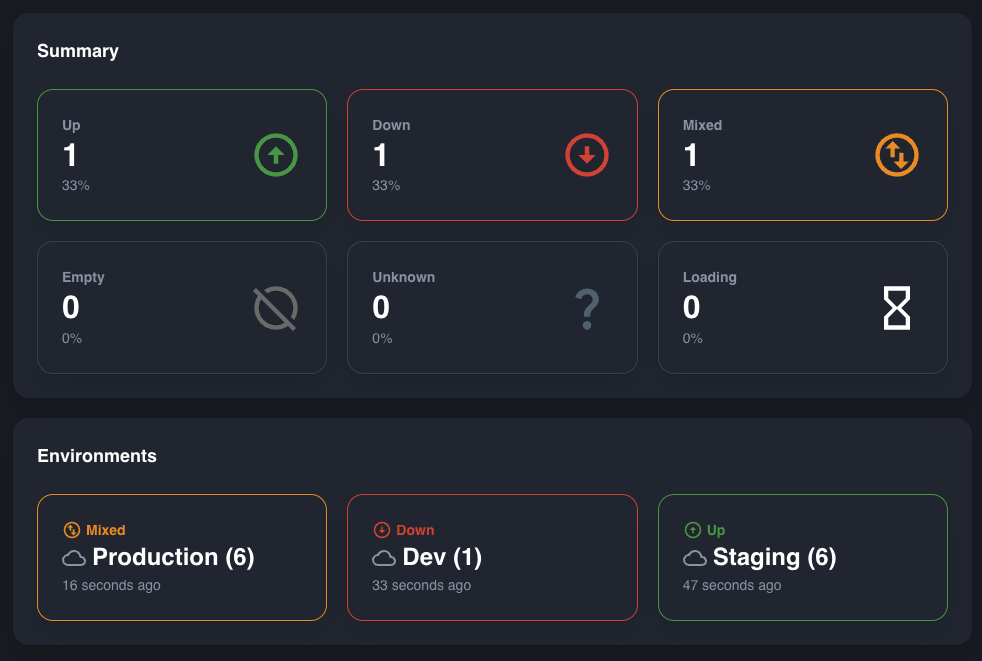
The dashboard visualizes the applications of the given folder and its sub-folders according to their respective health states in real time.

<figure><img src="/files/0s8z8AEGbl830ncB6XIp" alt=""><figcaption></figcaption></figure>


# Applications

### Overview

Applications allows you to see a list of the current folder and its sub-folders applications, as well as their up to date health.

<figure><img src="/files/yLft2kG0eU6dHummCWC4" alt="Ostara folder&#x27;s applications grid with real time health"><figcaption></figcaption></figure>


# Agent Features


# Overview


# Dashboard

### Overview

The dashboard visualizes the applications discovered by the agent, it displays the health states in real time.


# Application Features


# Overview


# Dashboard

### Overview

The Dashboard visualizes the application's instances and their respective health states in real time.

<figure><img src="/files/nwib49a798JhF9Gb2d0h" alt=""><figcaption></figcaption></figure>


# Instances

### Overview

Instances allows you to see a list of the current application's instances, as well as their up to date health. In cases where the [Shutdown Ability](/features/abilities) is active, it is also possible to shutdown individual instances via this page.

<figure><img src="/files/3Dnqop79TKheNUHiEEEM" alt=""><figcaption></figcaption></figure>


# Manage


# Loggers

### Overview

Loggers at the application level is exactly the same as the instance level [Loggers](/features/instance-features/manage/loggers), but apply their changes to every active instance within the application.&#x20;

### Usage

To change the log level of a given logger, simply click on one of the log levels to the right. The change will affect any other loggers within the hierarchy of the logger which were not explicitly set on Ostara or in the app configuration. At any point, you may press the **Reset** button on the right of any Ostara configured logger and reset it to its original state.

Loggers which were not configured, but inherit configuration will appear faded, whereas explicitly configured loggers will appear solid.

<figure><img src="/files/XF6zc3lm8qdlziYub4cE" alt=""><figcaption></figcaption></figure>

You can also filter the list to show only explicitly configured loggers by clicking on **Configured** in the top right:

<figure><img src="/files/wWvN3Rb8Gs7CnnGlDL1s" alt=""><figcaption></figcaption></figure>

Additionally, you can choose to only show loggers which represent classes by clicking on **Classes** in the top right

<figure><img src="/files/UwmIDw3idCeRIDK2f161" alt=""><figcaption></figcaption></figure>

In addition to this, if multiple instances have conflicting log levels for certain loggers, they will be displayed like so:

<figure><img src="/files/iujmrREZ4bJlfTagpMR6" alt=""><figcaption></figcaption></figure>

### Required Abilities

* [Loggers](/features/abilities)


# Caches

### Overview

Caches at the application level is exactly the same as the instance level [Caches](/features/instance-features/manage/caches), but apply their changes to every active instance within the application.&#x20;

Evicting a cache will attempt to evict it for all active instances, and cache statistics when present represent an aggregation of all instances where such statistics were found.

### Usage

There are 3 ways to evict caches.

1. Click on the broom icon next to an individual cache
2. Check several caches, and click on the broom icon in the green bar that appears
3. Click the broom icon at the top right, to evict all caches

<figure><img src="/files/sUpYCyIpbkkrzuLUDdtm" alt=""><figcaption></figcaption></figure>

When the **Cache Statistics** ability is present, the cache rows become expandable, and upon expansions display the cache statistics.

<figure><img src="/files/DqFEyUwtB12jWl5QkEvz" alt=""><figcaption></figcaption></figure>

### Required Abilities

* [Caches](/features/abilities)
* [Cache Statistics ](/features/abilities#abilities)(For statistics only)


# Monitor


# Metric Notifications

## Overview

In the Metric Notifications screen you can set rules regarding metrics in your Application, for which to receive notifications. Ostara periodically updates the Metrics from Actuator, and applies the rules defined. In the event a rule evaluation (by any instance) is TRUE a notification  will be triggered.

Note: Notifications will re-trigger after 60 seconds of continuous FALSE evaluation of the rule.

## Usage

You can define custom metric notification rules and/or use predefined rules.

### Predefined Rules

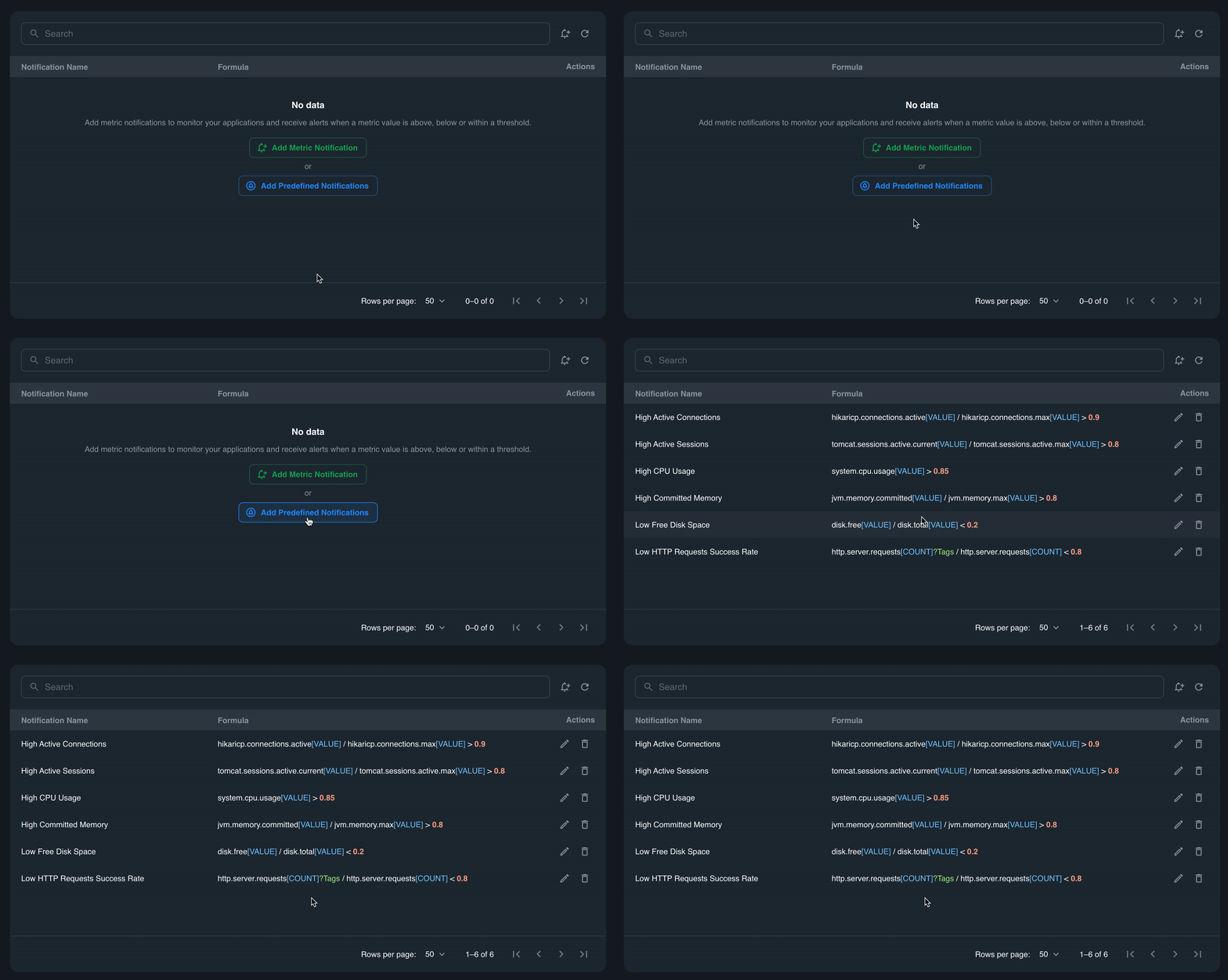
Add predefined rules by clicking on the button. Ostara will automatically detect what metrics are available and add the corresponding rules. It is recommended to update trigger values to better suit your applications behavior.

<figure><img src="/files/qOBP8VdiCjIxrtohz1o1" alt=""><figcaption></figcaption></figure>

### Custom Rules

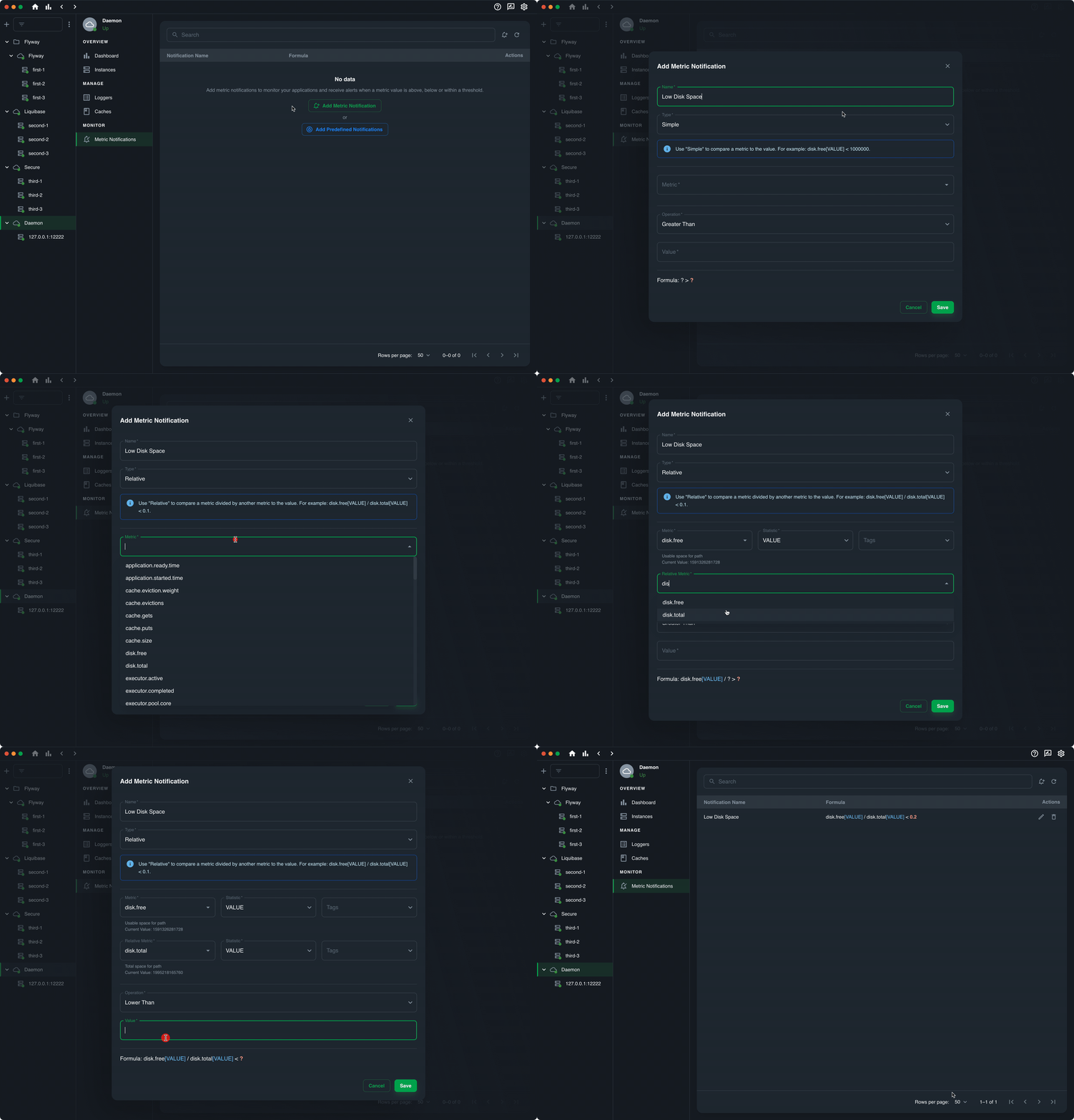
You can define custom rules by clicking on the "Add rule" button. Then define the metric you want monitored and the trigger value. Ostara supports 2 types of rules:

#### Simple rule

A simple rule monitors a single metric and will be triggered when the metric crosses the trigger value.

#### Relative rule

A relative rule is one that tracks the relative value between 2 metrics. It will be triggered when the relative value crosses the trigger value.&#x20;

For example - A relative rule for free disk space on your instance.

The first metric will be `disk.free` and the relative value will be `disk.total` now we can define that if this value is lower than 0.2 (%20) we want to receive a notification.

<figure><img src="/files/u2jxdkCKpZQJj0uYeYb6" alt=""><figcaption></figcaption></figure>

#### Operations

Ostara supports 3 operations to compare against the trigger value.

1. Lower than '<' - will trigger if the metric value (or relation) is lower than the trigger value.
2. Greater than '>' - will trigger if the metric value (or relation) is greater than the trigger value.&#x20;
3. Between - will trigger if the metric value (or relation) is between the set trigger values.


# Health Notifications

## Overview

Ostara sends real-time notifications to keep you informed of any changes in your actuator's health. Each time an application's health status change between Up / Down / Mixed a notification will be sent.

<div><figure><img src="/files/9EbHIkNCNYecDQFTayeO" alt="Application health status notification for Up"><figcaption></figcaption></figure> <figure><img src="/files/lMVpthU17EmFznxf0Eam" alt="Application health status notification for Down"><figcaption></figcaption></figure></div>

Notifications can be disabled or changed to silent mode in the app settings.


# Instance Features


# Insights


# Dashboard

### Overview

The dashboards shows basic usage information about the instance.

<figure><img src="/files/IYx15cfba3izHKbNpY05" alt=""><figcaption></figcaption></figure>

### Required Abilities

* [Metrics](/features/abilities)
* [Health](/features/abilities)


# Health

Overview

Health visualizes your application's active [health contributors](https://docs.spring.io/spring-boot/docs/current/api/org/springframework/boot/actuate/health/HealthContributor.html) into a helpful dashboard.

<figure><img src="/files/H5d2S3A1Bs09EQBrrjbL" alt=""><figcaption></figcaption></figure>

### Required Abilities

* [Health](/features/abilities)


# Info

### Overview

Info visualizes your application's active [info contributors](https://docs.spring.io/spring-boot/docs/current/api/org/springframework/boot/actuate/info/InfoContributor.html) into a helpful dashboard.

<figure><img src="/files/xqWmTRkTG9ow1xa6vqEs" alt=""><figcaption></figcaption></figure>

### Required Abilities

* [Info](/features/abilities)

### Troubleshooting

* [No data for Info](/troubleshooting/no-data-for-info)


# Metrics

### Overview

Metrics allows you to visualize your application's metrics and perform searches for different tag combinations.

### Usage

<figure><img src="/files/Z4qFjCPqsxzIcflXLYpF" alt=""><figcaption></figcaption></figure>

### Required Abilities

* [Metrics](/features/instance-features/insights/metrics)


# System Environment

### Overview

System Environment visualizes the application's environment variables.

<figure><img src="/files/UQ7yMM8n3vubjQ38PEWH" alt=""><figcaption></figcaption></figure>

### Required Abilities

* [System Environment](/features/abilities)

### Troubleshooting

* [Environment variables / System properties / App properties are partially or fully masked](/troubleshooting/environment-variables-system-properties-app-properties-are-partially-or-fully-masked)


# System Properties

### Overview

System Properties visualizes the application's JVM properties.

<figure><img src="/files/UQ7yMM8n3vubjQ38PEWH" alt=""><figcaption></figcaption></figure>

### Required Abilities

* [System Properties](/features/instance-features/insights/system-properties)

### Troubleshooting

* [Environment variables / System properties / App properties are partially or fully masked](/troubleshooting/environment-variables-system-properties-app-properties-are-partially-or-fully-masked)


# App Properties

### Overview

App Properties visualizes the application's configuration in a searchable YAML.

If there are multiple contexts, each context will be displayed in its own tab.

To open the search box, hit `⌘+F`  on MacOS or `Ctrl+F` on Windows.

<figure><img src="/files/sh8W0Fz4B0xIxVtdRInR" alt=""><figcaption></figcaption></figure>

### Required Abilities

* [Properties](/features/abilities)

### Troubleshooting

* [Environment variables / System properties / App properties are partially or fully masked](/troubleshooting/environment-variables-system-properties-app-properties-are-partially-or-fully-masked)


# Beans

### Overview

Beans allows you to visualize your application's beans, as well as see the connections between your beans as a visual graph.&#x20;

### Usage

The basic table shows you a list of expandable beans, containing the bean's name, package and [scope](https://docs.spring.io/spring-framework/docs/3.0.0.M3/reference/html/ch04s04.html)

<figure><img src="/files/pldRqkgioXCo0M9XobUG" alt=""><figcaption></figcaption></figure>

Upon expanding a bean, you will be able to see its type, and, if relevant, a list of dependencies. Clicking on a dependency will take you to its position in the table.

<figure><img src="/files/Iz665xVtOxyTNhvaoJh9" alt=""><figcaption></figcaption></figure>

By clicking on the icon on the right, you will open the dependency graph. \
The dependency graph shows the bean's dependent beans, as well as any beans that the bean requires or depends on.&#x20;

The principal bean will appear green, beans it depends on will appear yellow, and dependent beans will appear purple. The principal bean can be changed by clicking on another bean, and the selection can also be cleared to show all beans in the default color.

<figure><img src="/files/rIsTK71fon9KQnkrJwXM" alt=""><figcaption></figcaption></figure>

### Required Abilities

* [Beans](/features/abilities)


# HTTP Requests

### Overview

HTTP Requests allows you to view statistics regarding different endpoints in your system and their usage.&#x20;

### Usage

Each expandable row is divided into 4 cards

#### Methods

Shows the request count grouped by the different HTTP methods, their max time and their total time if present.

<figure><img src="/files/IDbx0PdW4VNkT88Os38K" alt=""><figcaption></figcaption></figure>

#### Statuses

Shows the request count grouped by the returned HTTP status codes, their max time and their total time if present.

<figure><img src="/files/WYg210QSmXUiRBHXagT9" alt=""><figcaption></figcaption></figure>

#### Outcomes

Shows the request count grouped by the request's outcomes, their max time and their total time if present.

<figure><img src="/files/K4ONyZnOjqebBisjwN7M" alt=""><figcaption></figcaption></figure>

#### Exceptions

Shows the request count grouped by the request's exceptions, their max time and their total time if present.

<figure><img src="/files/6cey55VGl0pCxbmxl8Jn" alt=""><figcaption></figcaption></figure>

### Troubleshooting

* [Not all requests appear in HTTP Requests](/troubleshooting/not-all-requests-appear-in-http-requests)

### Required Abilities

* [HTTP Request Statistics](/features/abilities)


# Quartz

### Overview

Quartz allows you to visualize your application's quartz jobs and triggers

#### Jobs

Each job is displayed in its own expandable row. The expanded view also shows all triggers for the job. Clicking on a trigger opens additional information.

<figure><img src="/files/fyrOLHRnFw8N8PrPKnpU" alt=""><figcaption></figcaption></figure>

#### Triggers

Each trigger is displayed in its own expandable row.

<figure><img src="/files/2PZhxyYtp6xQDCn8qIhE" alt=""><figcaption></figcaption></figure>

### Required Abilities

* [Quartz](/features/abilities#abilities)


# Scheduled Tasks

### Overview

Scheduled Tasks allows you to visualize your application's scheduled tasks, divided into 4 tabs.

#### Cron

Shows scheduled tasks with a cron expression (`@Scheduled(cron = "...")`)

<figure><img src="/files/zOqdkoAVGoFGhWLBavql" alt=""><figcaption></figcaption></figure>

#### Fixed Delay

Shows scheduled tasks with a fixed delay (`@Scheduled(fixedDelay = "5000")`)

<figure><img src="/files/ykHICcgW5WS4pfcQGr6V" alt=""><figcaption></figcaption></figure>

#### Fixed Rate

Shows scheduled tasks with a fixed delay (`@Scheduled(fixedRate = "5000")`)

<figure><img src="/files/mlrx5V4JJSplE4hziY0q" alt=""><figcaption></figcaption></figure>

#### Custom

Shows scheduled tasks with a custom trigger

<figure><img src="/files/32wv4Ge3ZTmVZSQ3kjhQ" alt=""><figcaption></figcaption></figure>

### Required Abilities

* [Scheduled Tasks](/features/abilities)


# Mappings

### Overview

Mappings allows you to see your application's servlets, filters, dispatcher servlets or endpoints and  dispatcher handlers if using Spring WebFlux.

<figure><img src="/files/lVJvYJQGJxONwb1RQvE6" alt=""><figcaption></figcaption></figure>

### Required Abilities

* [Mappings](/features/abilities)


# Flyway

### Overview

Flyway allows you to view Flyway migrations in a visual manner

<figure><img src="/files/hs7OqdhJ7i9wFnuOA1go" alt=""><figcaption></figcaption></figure>

### Required Abilities

* [Flyway](/features/abilities)


# Liquibase

### Overview

Liquibase allows you to view Liquibase migrations in a visual manner

<figure><img src="/files/zytLveYUGeKJRTKE6utp" alt=""><figcaption></figcaption></figure>

### Required Abilities

* [Liquibase](/features/abilities)


# Integration Graph

### Overview

The Integration Graph is a visual representation of Spring Integration flows

<figure><img src="/files/XsFs1dt0qaUM46bKwjDd" alt=""><figcaption></figcaption></figure>

### Required Abilities

* [Integration Graph](/features/abilities)


# Manage


# Loggers

### Overview

Ostara allows you to view and interact with your instance's loggers. Besides viewing the list of loggers, you're also able to change log levels.

### Usage

To change the log level of a given logger, simply click on one of the log levels to the right. The change will affect any other loggers within the hierarchy of the logger which were not explicitly set on Ostara or in the app configuration. At any point, you may press the **Reset** button on the right of any Ostara configured logger and reset it to its original state.

Loggers which were not configured, but inherit configuration will appear faded, whereas explicitly configured loggers will appear solid.

<figure><img src="/files/XF6zc3lm8qdlziYub4cE" alt=""><figcaption></figcaption></figure>

You can also filter the list to show only explicitly configured loggers by clicking on **Configured** in the top right:

<figure><img src="/files/wWvN3Rb8Gs7CnnGlDL1s" alt=""><figcaption></figcaption></figure>

Additionally, you can choose to only show loggers which represent classes by clicking on **Classes** in the top right

<figure><img src="/files/UwmIDw3idCeRIDK2f161" alt=""><figcaption></figcaption></figure>

### Required Abilities

* [Loggers](/features/abilities)


# Logfile

Available from version 0.11.0.

### Overview

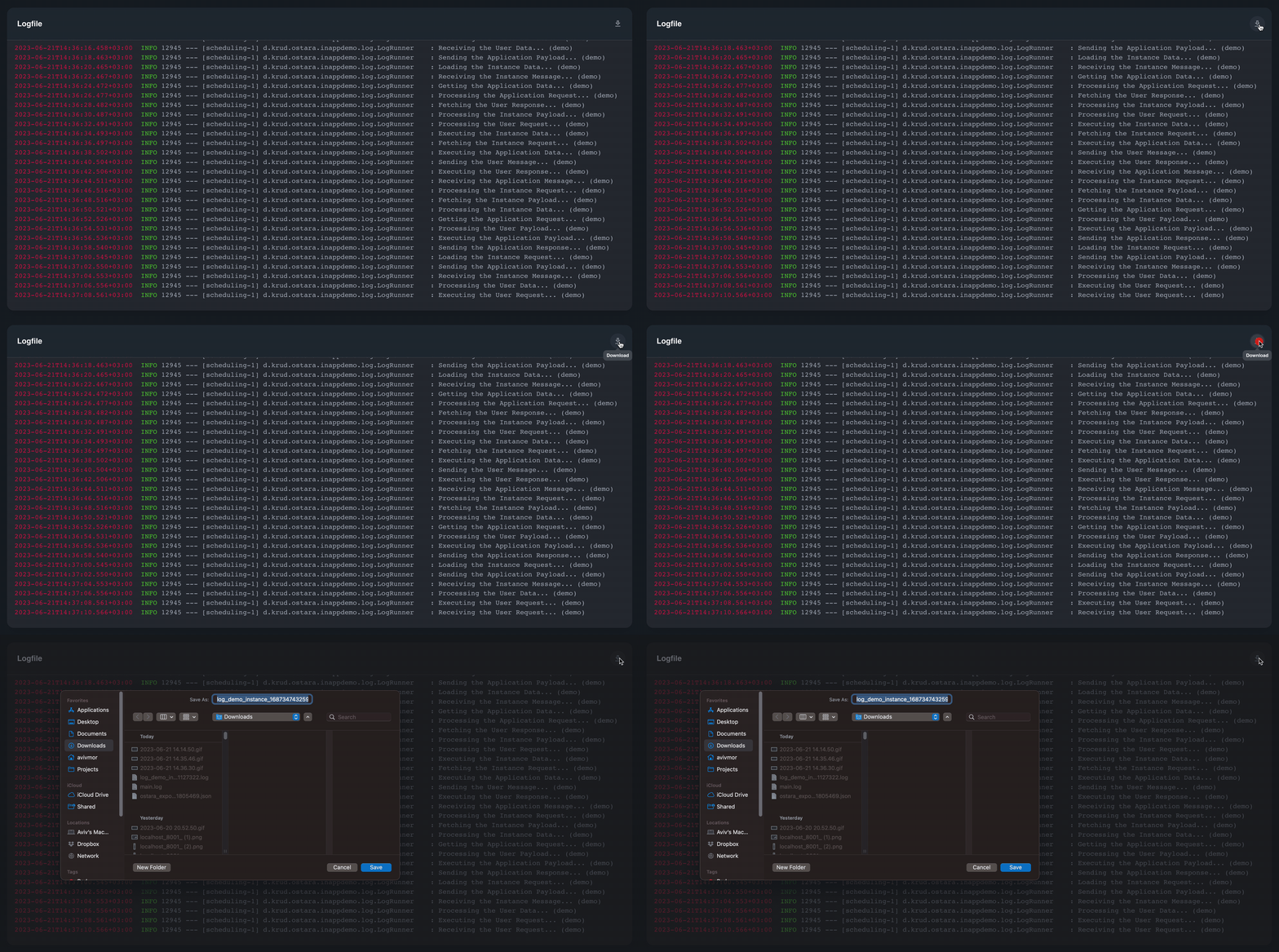
Ostara offers the convenience of viewing and downloading the contents of the instance's log file, enabling you to effortlessly access and analyze the log data.

### Usage

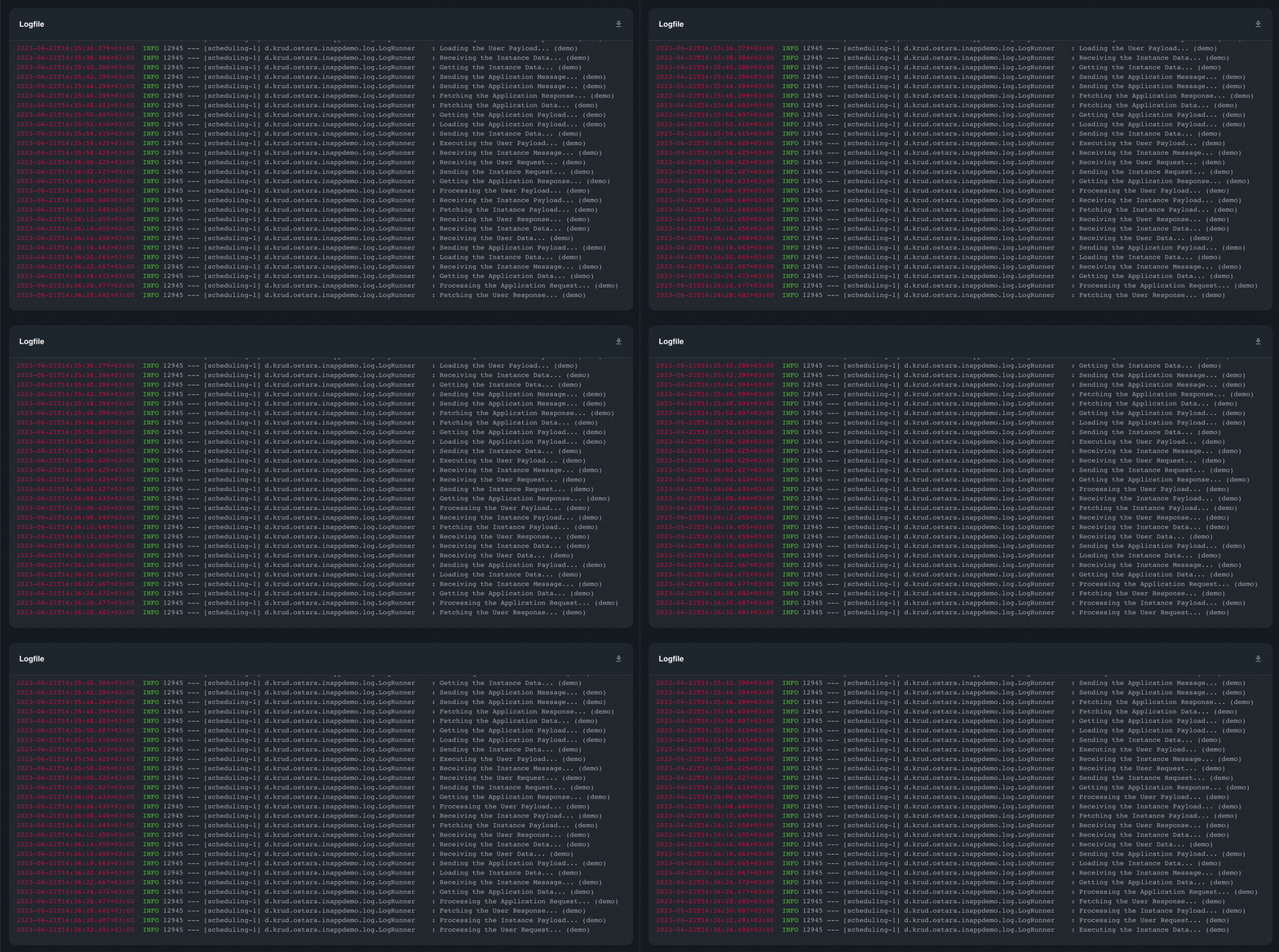
Ostara's logfile view presents the log file as a continuous stream of data, displaying the latest information. It provides real-time updates, allowing you to monitor the most recent log entries. However, to access the complete log file containing the entire history of events, it is necessary to download the log file locally.

<figure><img src="/files/VNiJqhJkKdD2KA53IKmv" alt="Spring Boot Actuator Logfile rolling view"><figcaption></figcaption></figure>

To download the complete log file, click the download button on the top right:

<figure><img src="/files/wecpTpXaFMVjMgTENaxV" alt="Download Spring Boot Actuator Logfile"><figcaption></figcaption></figure>

### Required Abilities

* [Logfile](/features/abilities)


# Caches

### Overview

Ostara allows you to view and interact with your instance's caches. Besides viewing the list of caches, you're also able to evict one or more. And, if present, view the statistics of the given cache.

### Usage

There are 3 ways to evict caches.

1. Click on the broom icon next to an individual cache
2. Check several caches, and click on the broom icon in the green bar that appears
3. Click the broom icon at the top right, to evict all caches

<figure><img src="/files/sUpYCyIpbkkrzuLUDdtm" alt=""><figcaption></figcaption></figure>

### Required Abilities

* [Caches](/features/abilities)


# Togglz

### Overview

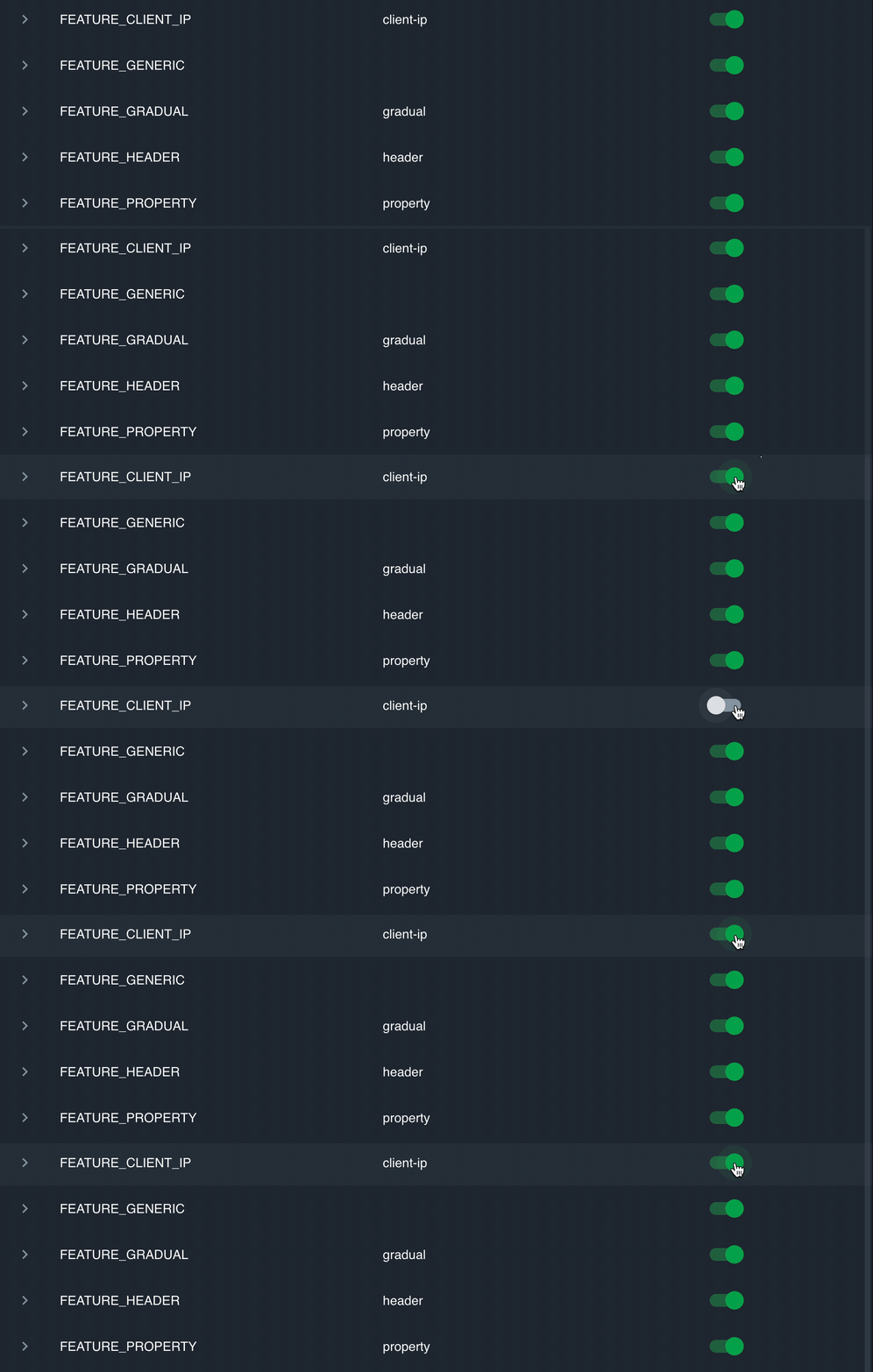
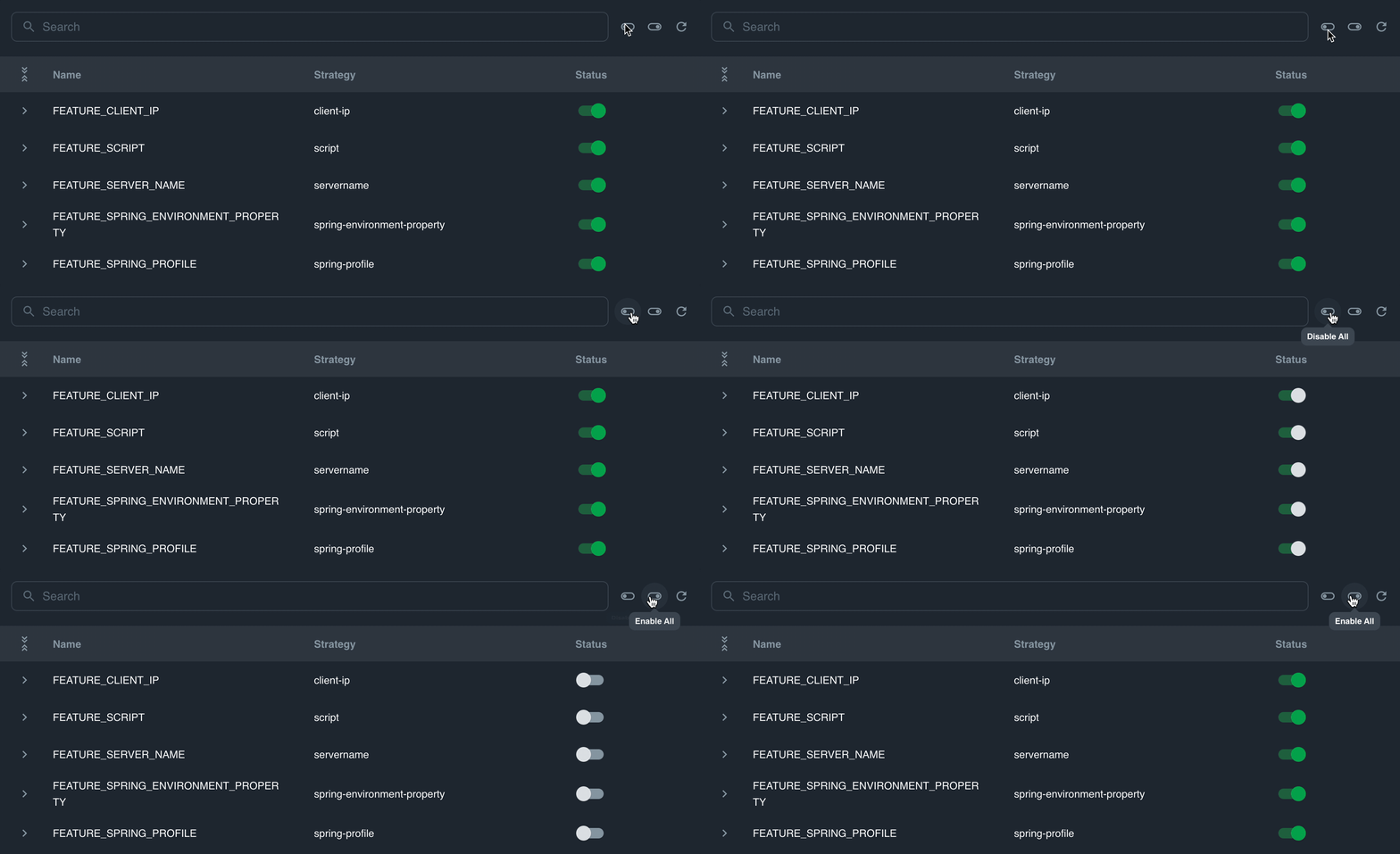
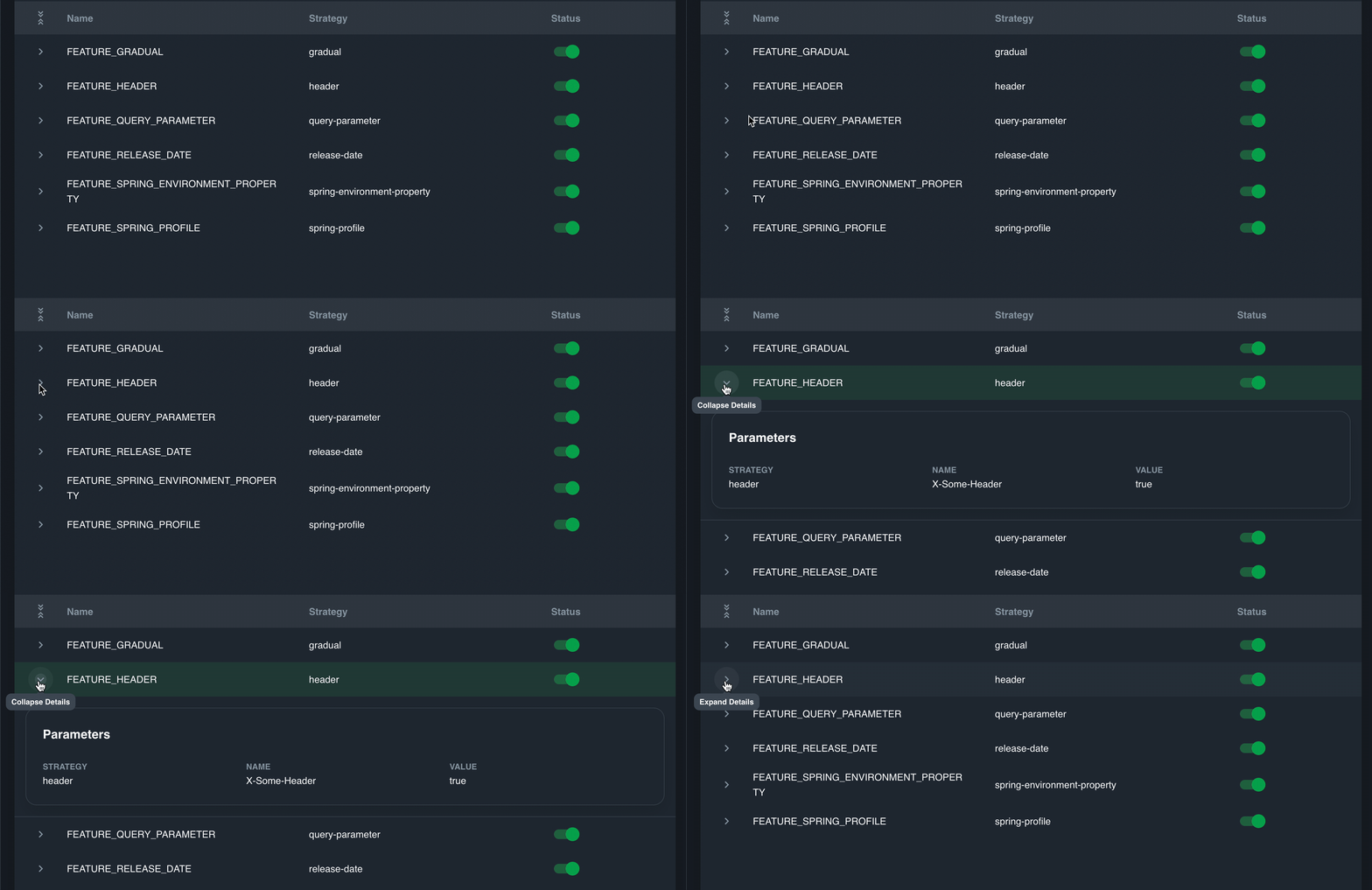
With Togglz's [Spring Boot Starter](https://www.togglz.org/documentation/spring-boot-starter.html) is installed, Ostara allows you to view and interact with your instance's features. In it, you're able to to toggle features on or off either as a group or individually, as well as view your strategy's parameters if set.

### Usage

To enable or disable a feature, click on the toggle next to it:

<figure><img src="/files/BLyBUbUAR3X3QxMYiaK2" alt=""><figcaption></figcaption></figure>

You can also enable and disable features in the same group:

<figure><img src="/files/itCw8I2v76bsiR93Be1J" alt=""><figcaption></figcaption></figure>

To view strategy parameters, expand the row:

<figure><img src="/files/bJ4ivE42yEtOWLUetsih" alt=""><figcaption></figcaption></figure>

### Required Abilities

* [Togglz](/features/abilities)


# JVM


# Thread Profiling

### Overview

Thread Profiling allows you to to profile the threads within your application for a set amount of time, after which you will be able to explore the results of the profiling.

### Usage

To initiate a new profiling, click the **Request Thread Profiling** at the top right

<figure><img src="/files/m2yhQNAWMG0ug4OXB1Er" alt=""><figcaption></figcaption></figure>

Upon completion, click the **View Details** action to reveal the profiling window

The profiler runs for 60 seconds and gathers all thread dumps form this time, grouping the data by thread and thread state over time.&#x20;

&#x20;     \- Represents threads in a `RUNNING` state

&#x20;     \- Represents threads in a `WAITING` state

&#x20;     \- Represents threads in a `TIMED_WAITING` state

<figure><img src="/files/51HQ52cP4BcBdqGnzdAH" alt=""><figcaption></figcaption></figure>

Each grouped block is expandable and will show the thread's details, as well as the stack trace. Multiple blocks can be expanded at a time.

<figure><img src="/files/kiQDHuiHLbfcOSRZ8ans" alt=""><figcaption></figcaption></figure>

### Required Abilities

* [Thread Dump](/features/abilities)


# Heap Dump

### Overview

Heap Dump allows you to download heap dumps from your instance.

### Usage

To download a heap dump, click the download icon at the top right and wait for the download to finish. Once it's done, you may delete it or save it to a folder of your choice.

<figure><img src="/files/toQXSa8mMeHQrUkWhUj4" alt=""><figcaption></figcaption></figure>

To delete a heap dump, click on the trash icon on the relevant row. You may also delete a heapdump while it's downloading to cancel the download.

<figure><img src="/files/iWqc9QgmoEivppyzLYdH" alt=""><figcaption></figcaption></figure>

### Required Abilities

* [Heap Dump](/features/abilities)


# Misc


# Shutdown

### Overview

Ostara allows you to shut down individual instances if the [Shutdown Ability](/features/abilities) is active. To perform a shutdown, right click on the instance in the tree or click on the instance icon when the instance is focused and click on **Shutdown**. A confirmation dialog will pop up, after which the instance will begin shutting down.

<figure><img src="/files/LFxW4reCgZ1jDGDsZ7mT" alt=""><figcaption></figcaption></figure>


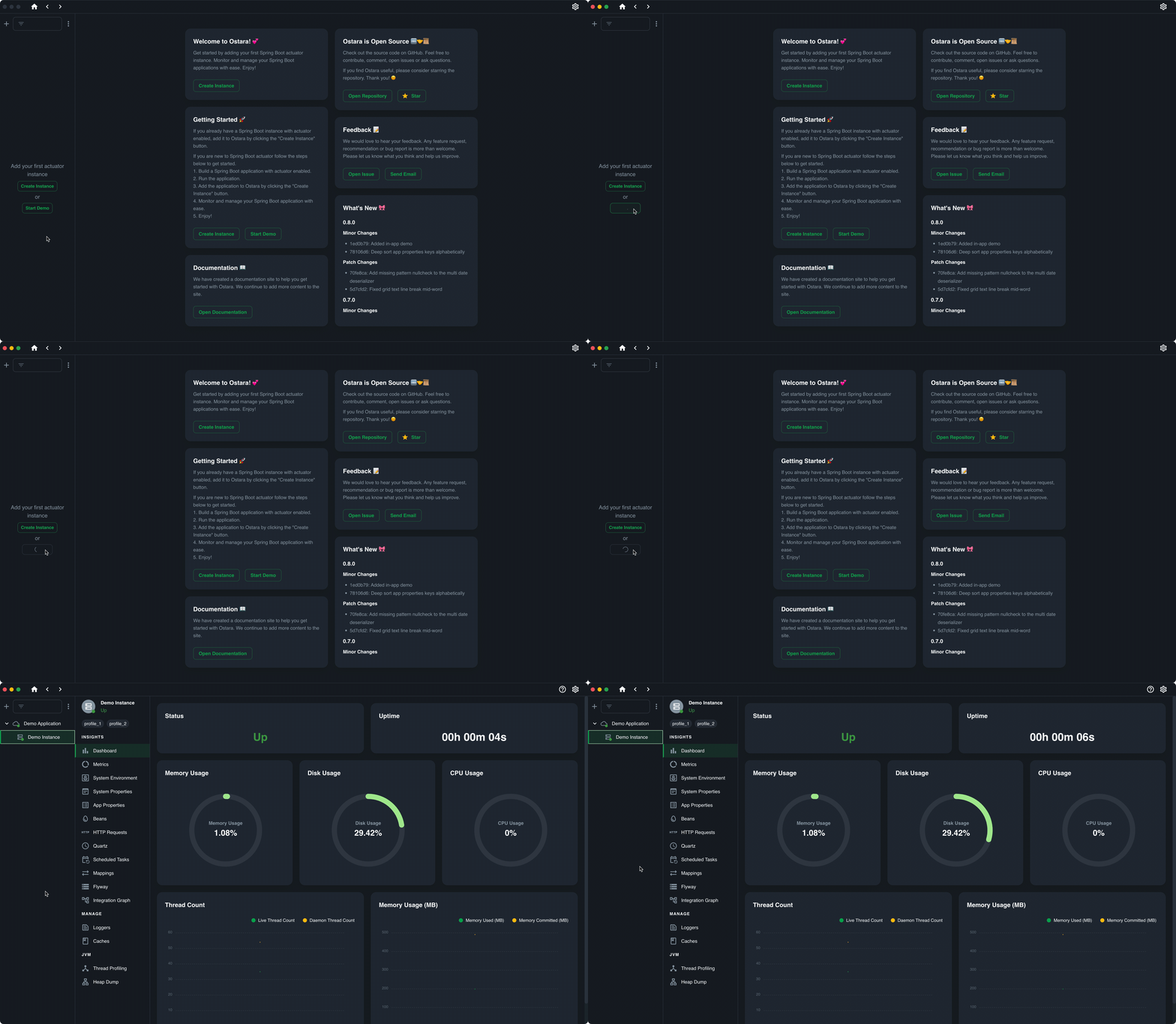
# In-App Demo

Ostara contains a built-in demo that allows you to play around with various features without having to have an existing Actuator instance. The demo is a live Spring Boot application with Actuator which will run in the background.

In order to start the demo, either click on **Start Demo** in the Ostara homepage

<figure><img src="/files/dnWCgjdGIqmEJ0Il3lOp" alt=""><figcaption></figcaption></figure>

Or, while having no instances, applications or folders, click on **Start Demo** in the sidebar

<figure><img src="/files/mJhMwdIaSuMQhQBJfibf" alt=""><figcaption></figcaption></figure>

To stop the demo, right click on the demo application or instance and click on **Stop Demo**

<figure><img src="/files/Ayy8TKwfnoMpTkopOCSU" alt=""><figcaption></figcaption></figure>


# Local Backups

### Overview

The local backup feature is designed to periodically capture and store snapshots of your Ostara configurations, and connections. These backups provide a safety net for system recovery and allow you to roll back to a previous known state if needed. The backups are saved locally on your machine and can be viewed/restored from the `Local Backups` window in the settings.

#### Automatic backups

The system will periodically create backups, these backups are rolling, so no more then 30 backups are saved. You can choose to restore them at any time. Additionally you are able to delete unwanted backups.

#### Manual Backups

From this screen you can also create manual backups. These backups can only be created and deleted manually, meaning the rolling feature will not clean up old backups.

<figure><img src="/files/xt4zVkp0WnB1r6EcWFjS" alt=""><figcaption></figcaption></figure>

#### Legend

![](/files/ewjIcJttPdpNs9L1IwEL) - Restore selected backup

![](/files/WANcdi7AIh2pDBGM80Kg) - Create new manual backup

#### Restoring a backup

When you restore a backup it will override the current configurations, you can see a preview of the backup to be restored.

<figure><img src="/files/XUtTwGHI1B0NTAKDEF4r" alt=""><figcaption></figcaption></figure>


# Connecting to Agents

### On Kubernetes

* Check that the pod is running
* Check that the port of the Agent is exposed
* Run `curl` to Agent port from within the cluster
* Run `curl` to Agent port from your local device

### Self Hosted

* Check that the Agent is running
* Check that the Agent port is open to the other services
* Run `curl` to Agent port from another service
* Run `curl` to Agent port from your local device


# Service Discovery

#### Kubernetes

* Check that you are running within the cluster, or that the server you are running can access the cluster
* Ensure your configuration is correct, including any filters for services to be discovered

#### ZooKeeper

* Check the Agent can connect to ZooKeeper URLs and ports.

#### Internal

* Make sure that the services have the `Client` dependencies
* Make sure you are using the correct API key from the Agent
* Run `curl` to Agent port from service device


# No data for Info

Some applications may not return any info contributors, resulting in an empty page.

This can be caused by a couple of reasons:

1. The `info` endpoint is not exposed, this can be solved by exposing `info` or adding `info` to an existing exposure using the `management.endpoints.web.exposure.include` property.&#x20;
   1. Example: `management.endpoints.web.exposure.include=info`
2. No info contributors exist. Some default info contributors can be enabled:
   1. [JavaInfoContributor](https://docs.spring.io/spring-boot/docs/current/api/org/springframework/boot/actuate/info/JavaInfoContributor.html) - enabled using `management.info.java.enabled=true`
   2. [OsInfoContributor](https://docs.spring.io/spring-boot/docs/current/api/org/springframework/boot/actuate/info/OsInfoContributor.html) - enabled using `management.info.os.enabled=true`

Additionally, you may also generate the build information for your application, which will enable the [BuildInfoContributor](https://docs.spring.io/spring-boot/docs/current/api/org/springframework/boot/actuate/info/BuildInfoContributor.html) and pass the git information to your application, which will enable the [GitInfoContributor](https://docs.spring.io/spring-boot/docs/current/api/org/springframework/boot/actuate/info/GitInfoContributor.html). Instructions on how to do that can be found [here](https://www.springcloud.io/post/2022-03/spring-boot-info-endpoint/#gsc.tab=0)


# Environment variables / System properties / App properties are partially or fully masked

In some cases, the values we get back from Actuator are intentionally masked and get sent back as **\*\*\*\*\*\*.** This is caused by configuration on the service end.

&#x20;

<figure><img src="/files/Btj53jUFs95Fzbn66x2R" alt=""><figcaption><p>Example of a heavily redacted System Properties</p></figcaption></figure>

### Spring Boot 2.X

Spring Boot 2.X masks keys with the following patterns by default:

* `password`
* `secret`
* `key`
* `token`
* `.*credentials.*`
* `vcap_services`

These patterns can be set using the following properties ([Reference](https://docs.spring.io/spring-boot/docs/1.5.22.RELEASE/reference/html/howto-actuator.html#howto-sanitize-sensible-values)):

* `endpoints.configprops.keys-to-sanitize=comma,delimited,list`&#x20;
* `endpoints.env.keys-to-sanitize=comma,delimited,list`

### Spring Boot 3.X

In Spring Boot 3.X, all values are masked by default. If this behavior is not desired, it can be controlled using by setting the following properties to either `always`  (Not recommended) or `when-authorized` and setting Ostara to authenticate with your application ([Reference](https://docs.spring.io/spring-boot/docs/current/reference/html/application-properties.html#appendix.application-properties)):

* `management.endpoint.configprops.show-values={always|when-authorized|never}`
* `management.endpoint.env.show-values={always|when-authorized|never}`&#x20;


# Not all requests appear in HTTP Requests

By default, Spring limits the amount of requests that return in the `http.server.requests` metric to 100. To change this, modify `management.metrics.web.server.max-uri-tags` to your desired value.


# Known Issues for Spring Boot 2

* `disk.*` metrics do not exist, leading to a partial dashboard display